
01
8around-acct-e2eFree with Team plan and up
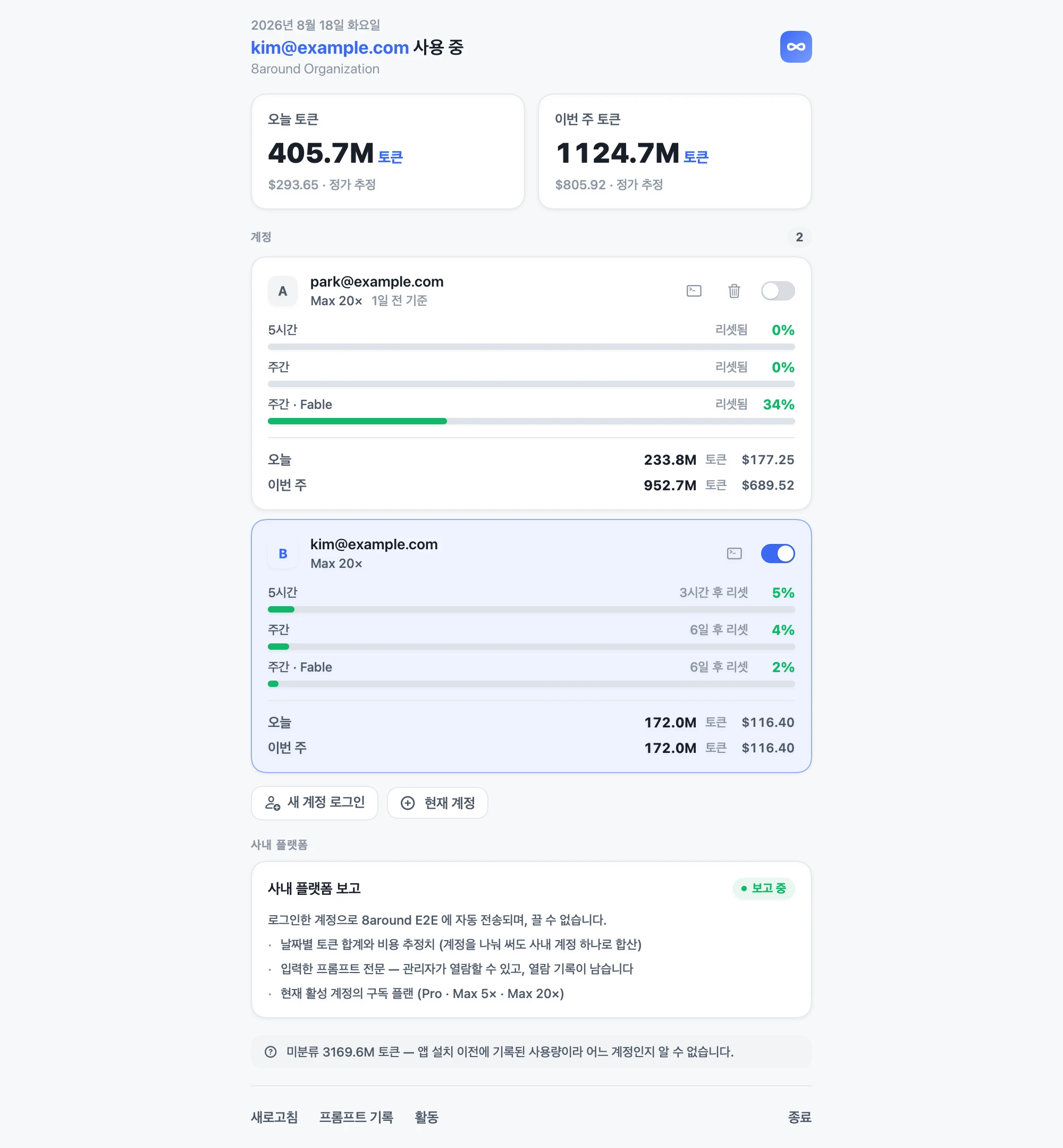
From the Team plan up, you also get the macOS desktop app 8around-acct-e2e. Switch between your team's Claude accounts from the menu bar and see right away how much each account has used.
Pricing
Every plan includes unlimited users. You pay per company, and every plan gets all features and AI Loopy. You can start for free.
For solo users or small teams trying it out first
Free
Free forever
For teams moving projects and team operations onto one platform
79,200KRW / mo
For companies that see projects, sales and revenue in one account
143,200KRW / mo
For running several companies or business units together
207,200KRW / mo
For companies that need it installed in their own cloud or on-premise servers, or need screens built around how they work
One-time services you can choose separately from your subscription.
A half-day hands-on session on putting AI into your workflow. Your team plugs it into the tools they use and walks away with it working.
We remove the screens you don't need, and build and add the ones you do after a consultation.
It isn't a product that handles accounting entries, tax or inventory like an ERP. It's an All-in-one work management platform for managing projects, HR, sales and revenue in one account.
It guides you and keeps projects on track from start to finish. At kickoff it proposes this week's goals, and every morning it reads your projects and daily reports and briefs you on empty plans, unresolved work and slow projects. It reaches out first to people who haven't written their daily report, and tells you which deals have stalled in the sales pipeline and how much is left to this month's revenue goal. Anything that changes data is posted as a proposal and only applied once a person approves it. It's available on every plan.
Yes. The Free plan is free forever. You get 1 workspace, unlimited users, and up to $3/mo of AI Loopy shared across the company. When you need more, you can upgrade to a paid plan right inside the app.
Yes. Choose 'Create a new company' on the sign-up screen and you start immediately, no approval needed. If you need setup tailored to your company, data migration or onboarding training, reach out through the contact form.
No. Data is separated per company (workspace), and only people approved as members of that company can see it. We also offer custom deployment installed separately on your own servers — contact us to discuss.
No. Every plan includes unlimited users. Plans differ only by number of workspaces and AI Loopy monthly limit.
We'll move data from Excel, Notion and similar tools for you. We'll need some cooperation, such as account access, and we agree on the scope during consultation.
After you cancel, we keep it as is for 6 months. If you restart within that time you can pick up where you left off; after that, it's deleted. If you want it deleted right away, just let us know.
If your team uses Claude
See how much the whole team uses inside Sprintingo, and how much your own account has left from the menu bar.
From the Team plan up, you also get the macOS desktop app 8around-acct-e2e. Switch between your team's Claude accounts from the menu bar and see right away how much each account has used.
No limit on the number of accounts. Switch the same way from the menu bar or the window.
See per account how full the 5-hour and weekly limits are, and when they reset.
Measures tokens and cost used today and this week, per account.
macOS · Supports both Intel and Apple silicon · Sign in with your Sprintingo account
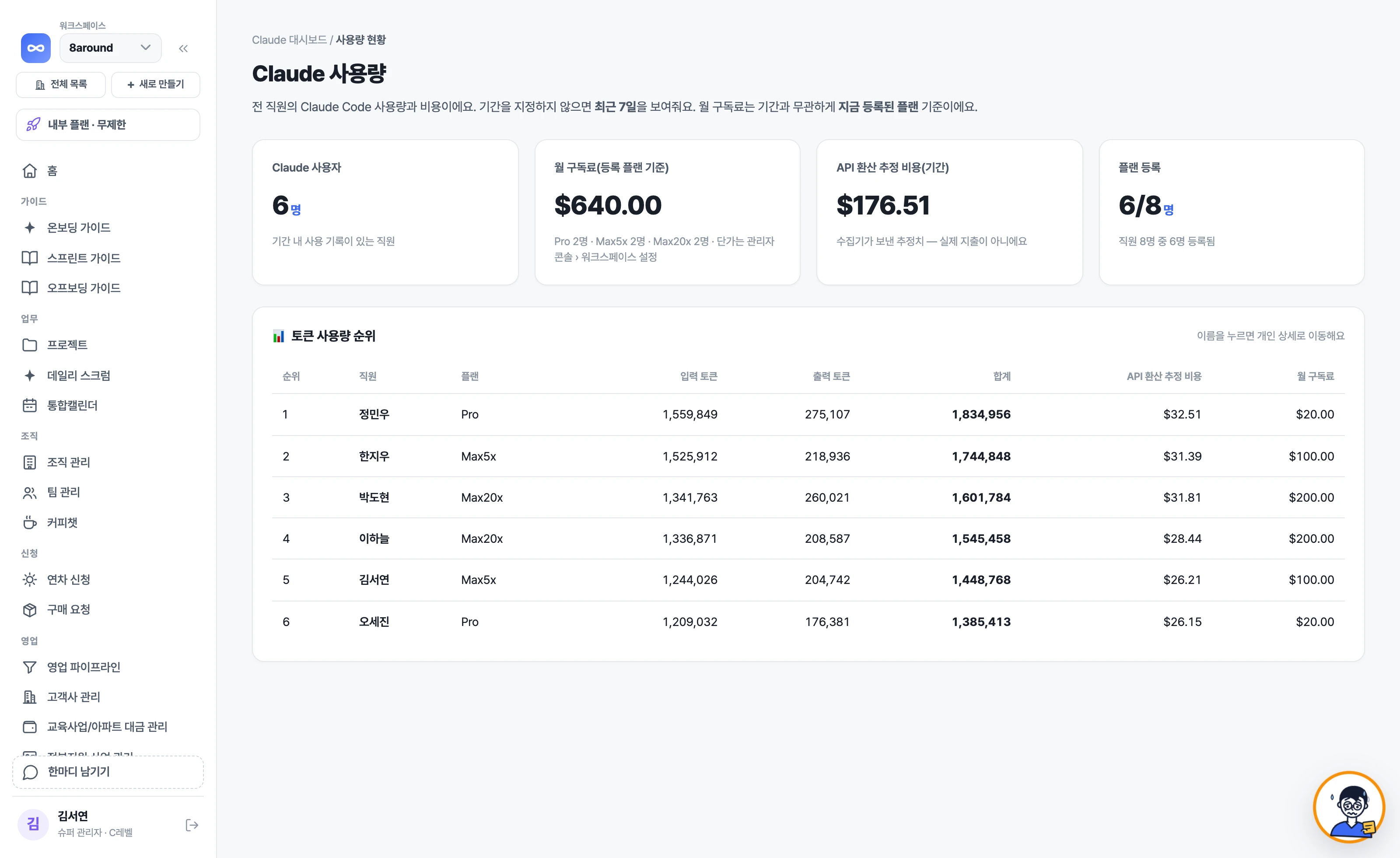
See how much your team uses Claude Code, person by person. Costs are estimates converted at API rates, and you can manage plan registrations here too.
Tell us how you work today, and we'll show you on your company's own screens what Loopy will keep track of every day.